In this post I’m going to explain reading data with select, where, and aliases for MySQL, using the Feynman technique and the sci fi space western series: Star Wars.
This post is part of the Feynman/20-hour challenge. For more information, click here.
Before you read further, please note that there will be spoilers for The Mandalorian Season 2 in this post, so if you’re not up-to-date with the series finale, and wish not to be spoiled, you have been warned.
Reading and Pulling in MySQL
In MySQL, and other databases, the basic operations of data manipulation are summed up into a single acronym: CRUD (sounds like something out of Star Wars, doesn’t it?), which stands for Create, Read, Update, and Delete. We’ve already created databases and tables in the last few MySQL posts. This time around we’re going to tackle reading and pulling information from databases with the Select, Where, and Alias methods.
For those who have been watching the Star Wars Mandalorian series, think of it as going through someone or something’s chain code to find them. In our case, we’re going to include in our chain code “ID number”, “name”, “title”, and “origin”.
Starting Code:
create table starwars
(
    id int not null auto_increment PRIMARY KEY,
    name varchar(100) not null,
    title varchar(100) not null,
    origin varchar(100) not null
);

insert into starwars(name, title, origin)
values('Han Solo', 'Smuggler/General', 'Corellia'),
('Leia Organa', 'Princess/General', 'Alderaan'),
('Luke Skywalker', 'Farmer/Jedi', 'Tatooine'),
('Rey', 'Scavenger/Jedi', 'Jakku'),
('Finn', 'Storm Trooper/Resistance General', 'Artoris'),
('Poe Dameron', 'Resistance General', 'Yavin 4'),
('Jango Fett', 'Bounty Hunter', 'Concord Dawn'),
('Din Djarin', 'Mandalorian', 'Zanbar'),
('Grogu', 'Baby Yoda', 'Coruscant'),
('Anakin Skywalker', 'Jedi/Sith Lord', 'Tatooine'),
('Jabba the Hutt', 'Crime Boss', 'Tatooine');
The code above produces the below output. (FYI – because wide MySQL code doesn’t translate in cross-device viewing, I’m placing the wider outputs as images).
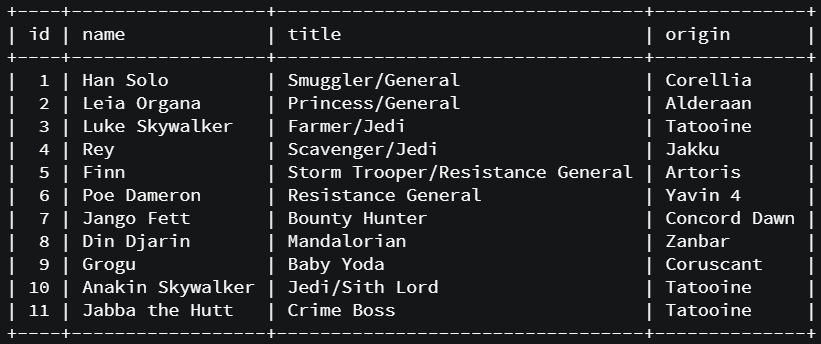
Select allows us to see what’s in our table. If we use the code:
SELECT * FROM starwars;…our entire table above gets displayed.
Ways to Display
The “*” in the code means “show me everything”, essentially saying “select ‘show me everything’ from <whatever table I choose>;”.
You can also use the “Select Method” to pull up specific columns, such as the name and origin columns:
select name, origin from starwars;Below is what our output looks like:
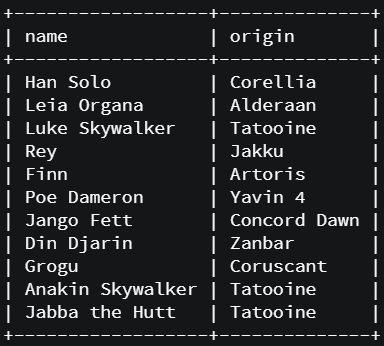
We can re-arrange the way we get our table columns. In the next case, instead of id, name, title, and origin, we decide we want our info to come out in the following order: origin, title, and name.
select origin, title, name from starwars;As you can see, we can re-arrange how our table looks, as long as the columns exist in the table.
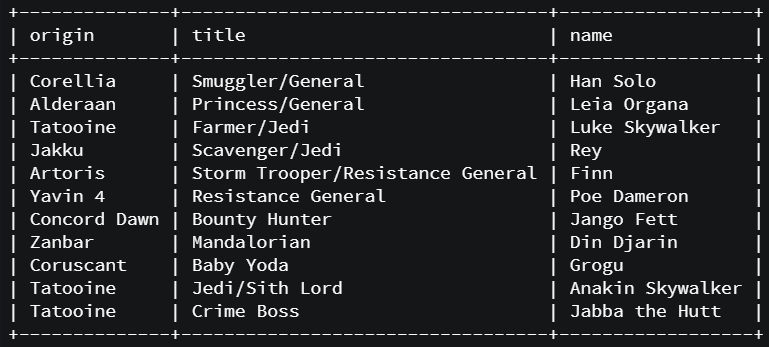
Kind of like how the Star War movies, episodes 4, 5, and 6 were released decades before episodes 1, 2, and 3.

Where Method
The “Where Method” allows us to go deeper into the information we’d like to pull. We can request specific sets of data and whatever in our table fulfills those requirements will be pulled. In the below case, we ask, in the table named “starwars” where “grogu” comes up in the column “name”, we get the following:
select * from starwars where name='grogu';
+----+-------+-----------+-----------+
| id | name  | title     | origin    |
+----+-------+-----------+-----------+
|  9 | Grogu | Baby Yoda | Coruscant |
+----+-------+-----------+-----------+
A couple of things about pulling information using “where”: when it comes to pulling information, it’s not case sensitive, meaning, even if the capitalization of the information does not match the original information added to the table, it will not affect the pull.
SELECT * FROM starwars WHERE title='resistance general';…produces this…
+----+-------------+--------------------+---------+
| id | name        | title              | origin  |
+----+-------------+--------------------+---------+
|  6 | Poe Dameron | Resistance General | Yavin 4 |
+----+-------------+--------------------+---------+
Even though Poe and Finn were both listed as “Resistance General” in their title, Finn also had “Storm Trooper” as well. This is why Finn did not come up when we did the “Where Method” pull. Partial information is not enough for the “Where method”. We need full information or else, it will not show up in our output.

Just like the fact that we know which Jedi is still alive in the Mandalorian timeline, it’s still not enough info to guess who is coming to teach Grogu until we see who’s lightsaber comes out of the fog. 😮😮😮

Search Terms Not Included in Output
Something interesting about this search method is your search criteria does not need to be in your output. In the code below, we used the “Where Method” to pull all those from “Tatooine”, however, we only want to see the names and the titles of people who are originally from there. Below is the code we inputted into MySQL:
select name, title from starwars where origin='tatooine';As you noticed, only the name and title columns are available. The origin column is nowhere to be seen, but we know if we look at the main table at the top of the post, all three characters are from Tatooine.
+------------------+----------------+
| name             | title          |
+------------------+----------------+
| Luke Skywalker   | Farmer/Jedi    |
| Anakin Skywalker | Jedi/Sith Lord |
| Jabba the Hutt   | Crime Boss     |
+------------------+----------------+
The Alias Method
In case we want to display columns under different names, we can do so. The “Alias Method” allows us to temporarily change the names of a column to whichever we choose. As long as it does not conflict with an already designated keyword in MySQL, it can be used. Here we use the “as” keyword to change the name of “title” into “profession”, only displaying the name and title columns:
select name, title as profession from starwars;As you can see, the “name” column is unchanged, however, the “title” column name has been changed to “profession”.
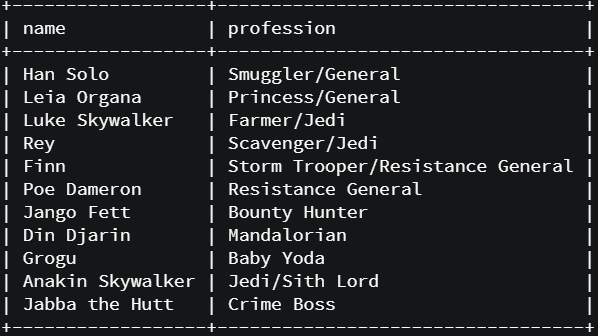

We can do this with multiple columns as well. In the below case, we swapped out the name of “origin” to “homeworld” and change “title” to “profession”.
select name, origin as homeworld, title as profession from starwars;Also, just like the standard “Select Method”, we are able to re-organize the order of our columns on top of changing the names with the “Alias Method”.
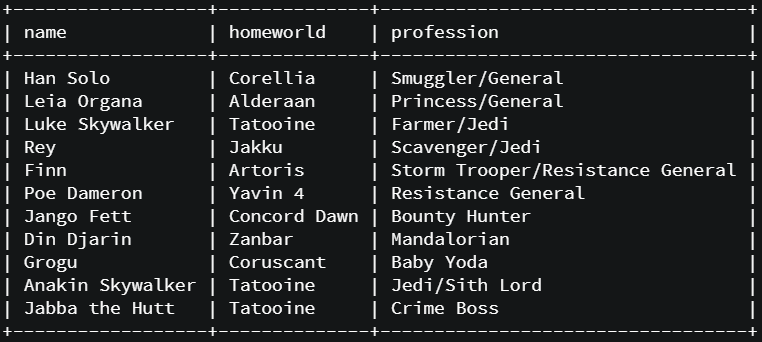
As stated earlier, the changing and re-arranging of the column names and output orders do not affect the original field name and order. Below we asked MySQL to “Describe our StarWars table below after all the changes we requested and the following output came back.

DESC starwars;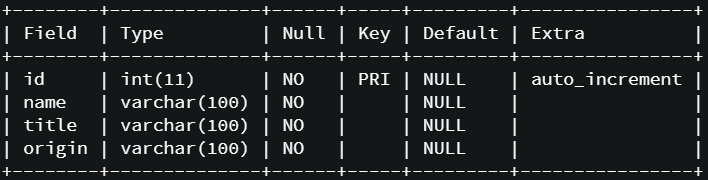
And all was right in the force.